Learning from MistakesGuwol Middle School구월중학교
Classroom visit · Tue 10 November 2026수업 참관 · 2026년 11월 10일(화)

Learning from Mistakes오답의 재발견

A Grade 7 mathematics class where students first write down what they think, test it with 3D tools, and change their minds with evidence — supported by an AI-enabled classroom platform built by the teacher.학생이 먼저 자기 생각을 기록하고, 3D 도구로 직접 확인하며, 근거를 가지고 생각을 바꾸는 중학교 1학년 수학 수업입니다. 수업을 돕는 AI 기반 수업 시스템은 담당 교사가 직접 만들었습니다.

Grade 7Middle school year 1 · 10 classes중학교 1학년 · 10개 반
Solids of revolution회전체Geometry unit in focus집중 단원
45 minOne lesson, 15 web pages한 차시, 웹 활동지 15쪽
Firebase + AITeacher-built platform교사가 직접 만든 수업 시스템

1The project: Learning from Mistakes프로젝트: 오답의 재발견

A national pilot run with the Korea Foundation for the Advancement of Science and Creativity (KOFAC) and the Incheon Metropolitan Office of Education. Guwol Middle School is a pilot school (Grade 7, regular math lessons in all 10 classes).한국과학창의재단·인천광역시교육청 운영학교 사업입니다. 구월중학교는 1학년 10개 반 정규 수학 수업에서 운영합니다.

✍️
1. Record thinking1. 생각 기록

Answer + reason + confidence (1–4) before any feedback.답 + 이유 + 확신도(1~4)를 먼저 남깁니다.

🔎
2. Diagnose2. 오개념 진단

Each wrong option is linked to a known misconception; a confident wrong answer counts as evidence.틀린 보기마다 오개념이 연결되어 있고, 자신 있게 틀린 답을 증거로 셉니다.

🧭
3. Teacher prescribes3. 교사 처방

The class map of misconceptions shapes the next lesson: counter-examples, 3D checks.반 전체 오개념 지도를 보고 다음 수업의 반례·3D 확인 활동을 고릅니다.

🔁
4. Rethink4. 다시 생각

Students revisit the same question and explain what changed (3-Step reflection).같은 질문을 다시 풀고 무엇이 바뀌었는지 설명합니다(3-Step 회고).

🛠️
5. Make it real5. 실생활로 만들기

Back to everyday life: students build a real-world solid of revolution with digital tools (AlgeoMath 3D), decorate it (Paint 3D) and bring it to life in augmented reality.다시 실생활 맥락으로: 실생활 회전체를 공학도구(알지오3D)로 직접 만들고, 그림판3D로 꾸미고, 증강현실(AR)로 구현합니다.

AI comes after thinking.AI는 생각한 다음에. The AI never gives the answer first. It asks follow-up questions only after the student has committed to an answer, and the student's first answer stays locked.AI가 먼저 답을 주지 않습니다. 학생이 답을 정한 뒤에만 되묻는 질문을 하고, 처음 답은 고칠 수 없게 남깁니다.

2The classroom platform (built by the teacher)수업 시스템(교사가 직접 개발)

One website for students and teachers, running on Google Firebase. Students sign in with their school Google account; every record stays connected to the same student across lessons.학생·교사가 함께 쓰는 하나의 웹사이트(구글 Firebase). 학생은 학교 구글 계정으로 로그인하고, 모든 기록이 한 학생 이름으로 이어집니다.

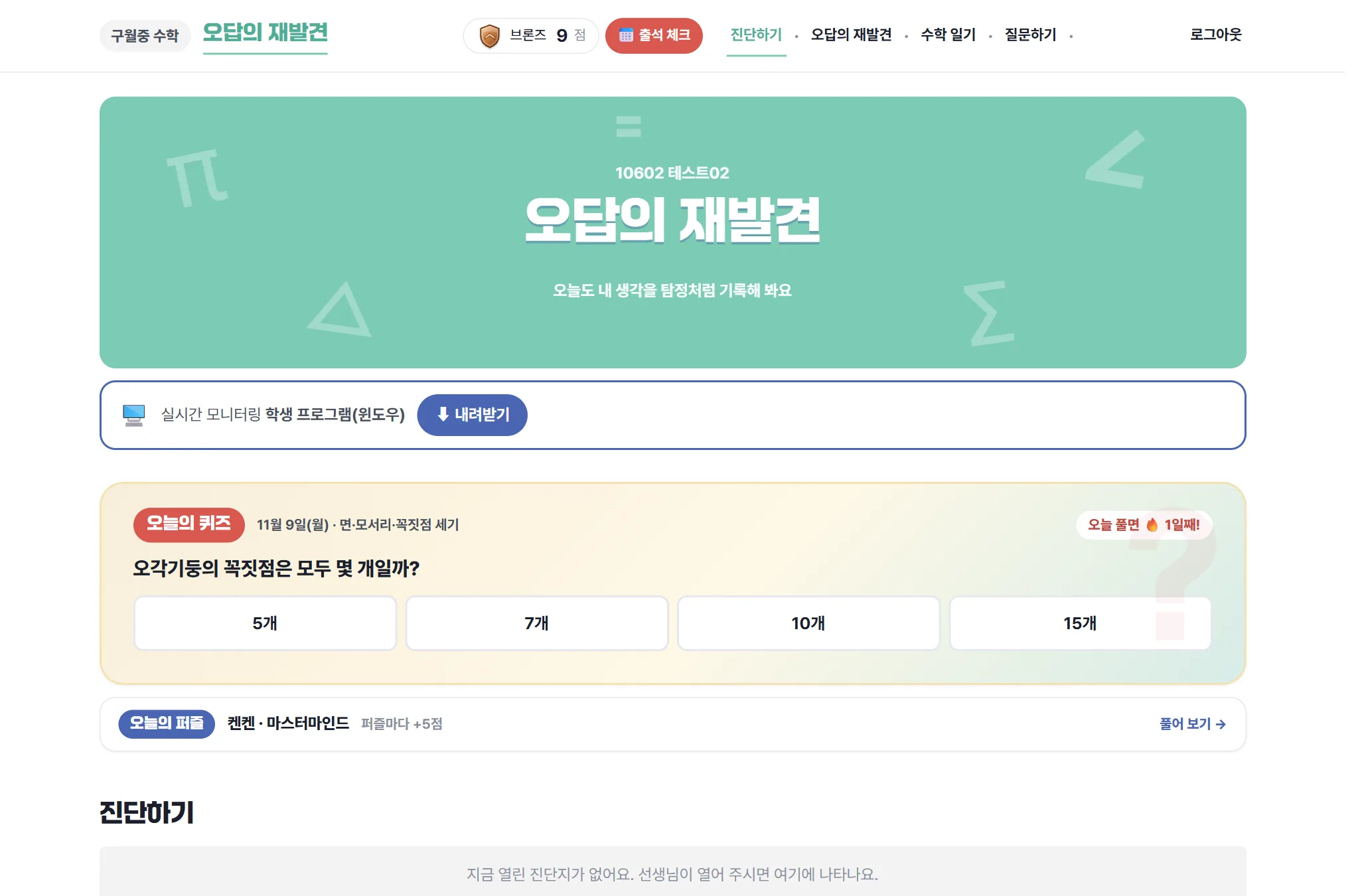
Student home: daily quiz, diagnosis, tiers학생 홈: 오늘의 퀴즈·진단·티어

  • Pre/post diagnosis with answer, reason and confidence; post-tests use parallel items (same concept, different look).사전·사후 진단: 답·이유·확신도. 사후는 같은 개념, 다른 겉모습의 동형 문항.
  • Today's quiz: one question a day for everyone; a wrong option explains why it is tempting.오늘의 퀴즈: 매일 같은 한 문제, 틀린 보기를 고르면 왜 헷갈리는지 설명.
  • Points & game-style tiers (Bronze → Master) for participation and effort only — never for correctness. Points can be exchanged for snacks.포인트·티어(브론즈→마스터)는 참여·노력에만, 정답과 무관. 간식으로 교환.
  • Math diary linked to the school timetable, with teacher replies. (More in section 3.)수학 일기: 학교 시간표와 연결, 교사 답장. (자세한 내용은 3장)
Live lessons: the teacher controls the flow실시간 수업: 교사가 흐름을 이끈다

  • The teacher opens steps one by one, brings everyone to a step, and can lock answers after a 30-second countdown.교사가 단계를 하나씩 열고, 모두를 한 단계로 모으고, 30초 뒤 답을 마감할 수 있습니다.
  • Step-by-step monitoring shows every answer as it is written (filters: wrong, confidently wrong, not submitted).단계별 모니터링에서 쓰는 중인 답까지 보고, 오답·자신 있는 오답·미제출로 거릅니다.
  • AI feedback (Google Gemini) at the end of a lesson, written for the student's own record.차시가 끝나면 학생 기록을 바탕으로 AI(Gemini) 피드백.
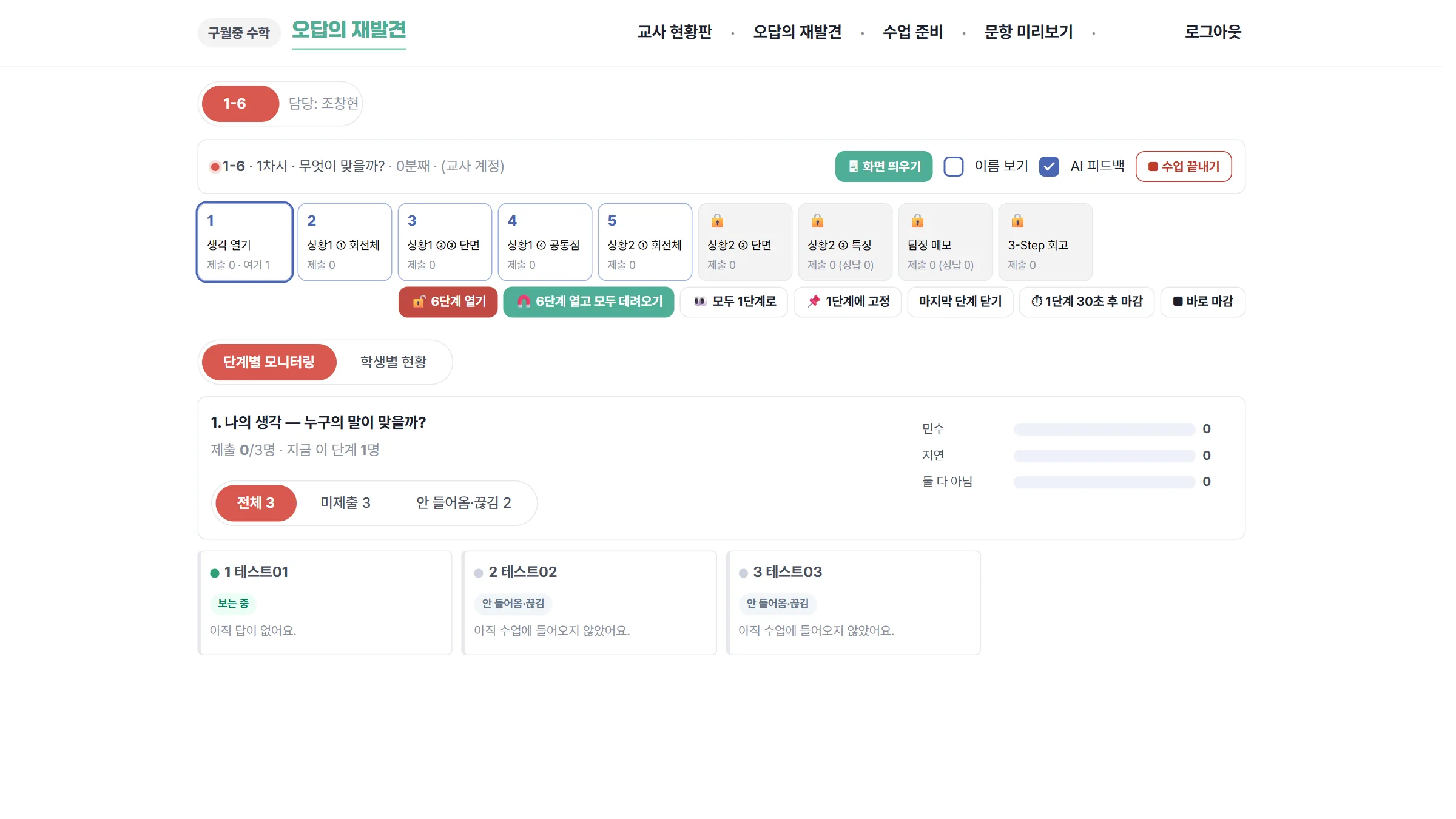
Making solids: AlgeoMath 3D → Paint 3D → AR회전체 만들기: 알지오3D → 그림판3D → AR

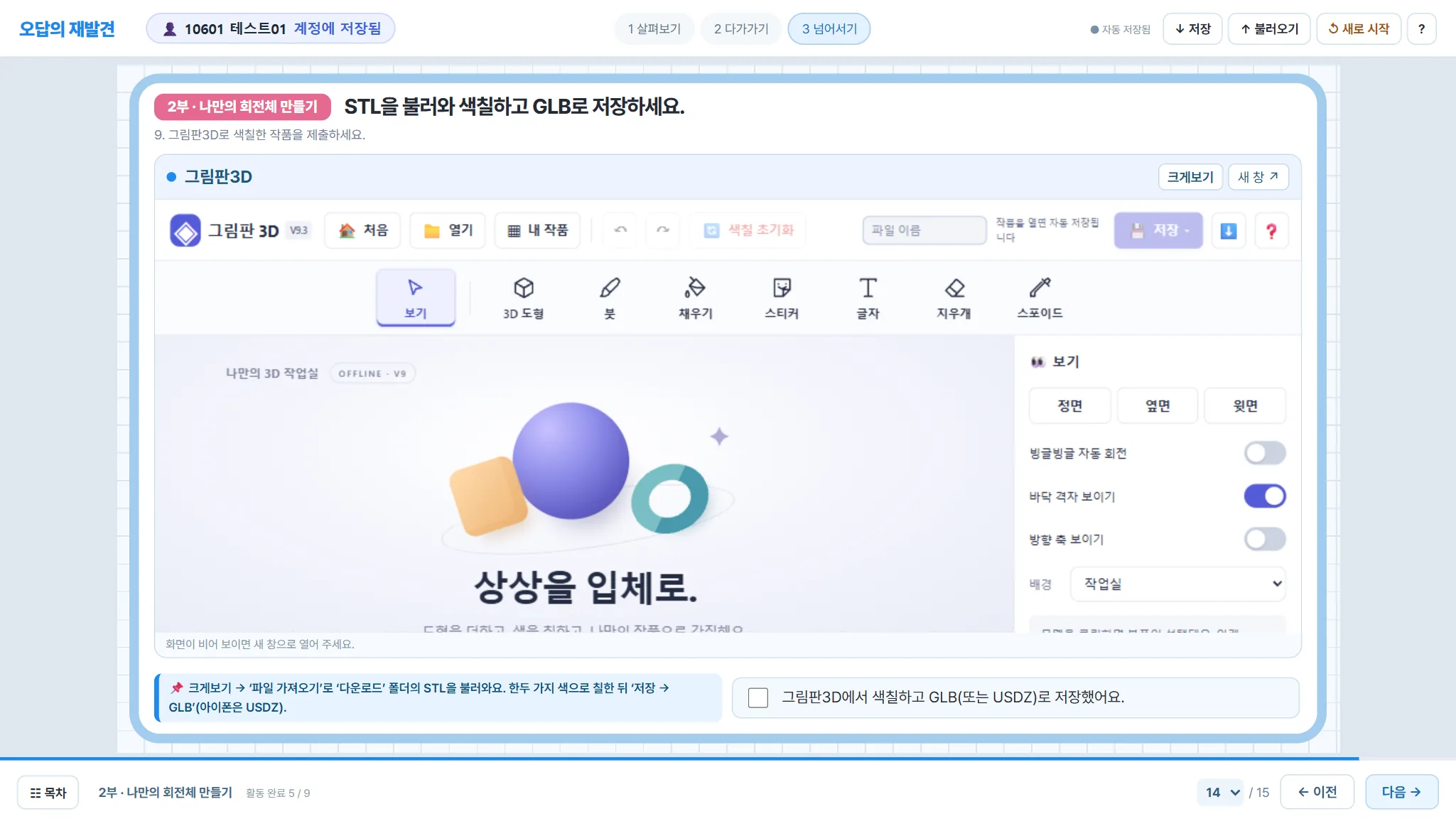
  • The web worksheet embeds AlgeoMath 3D (national math tool) and the teacher's own Paint 3D web app.웹 활동지 안에 알지오3D(국가 수학 도구)와 교사가 만든 그림판3D를 넣었습니다.
  • The platform saves a small snapshot of each student's AlgeoMath screen, so the teacher sees who has actually rotated a figure.알지오3D 화면을 작은 사진으로 남겨, 누가 실제로 회전시켰는지 교사가 봅니다.
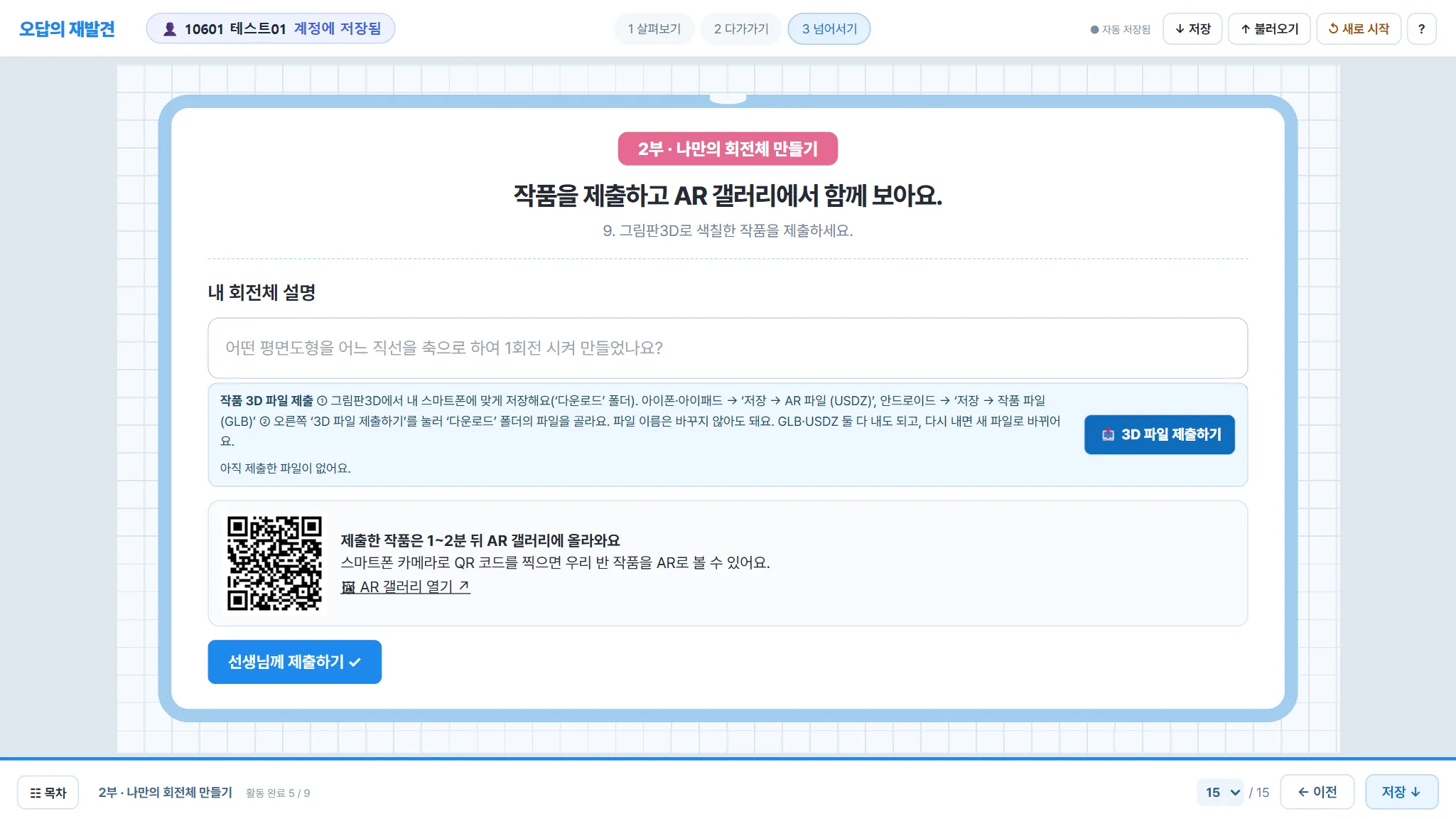
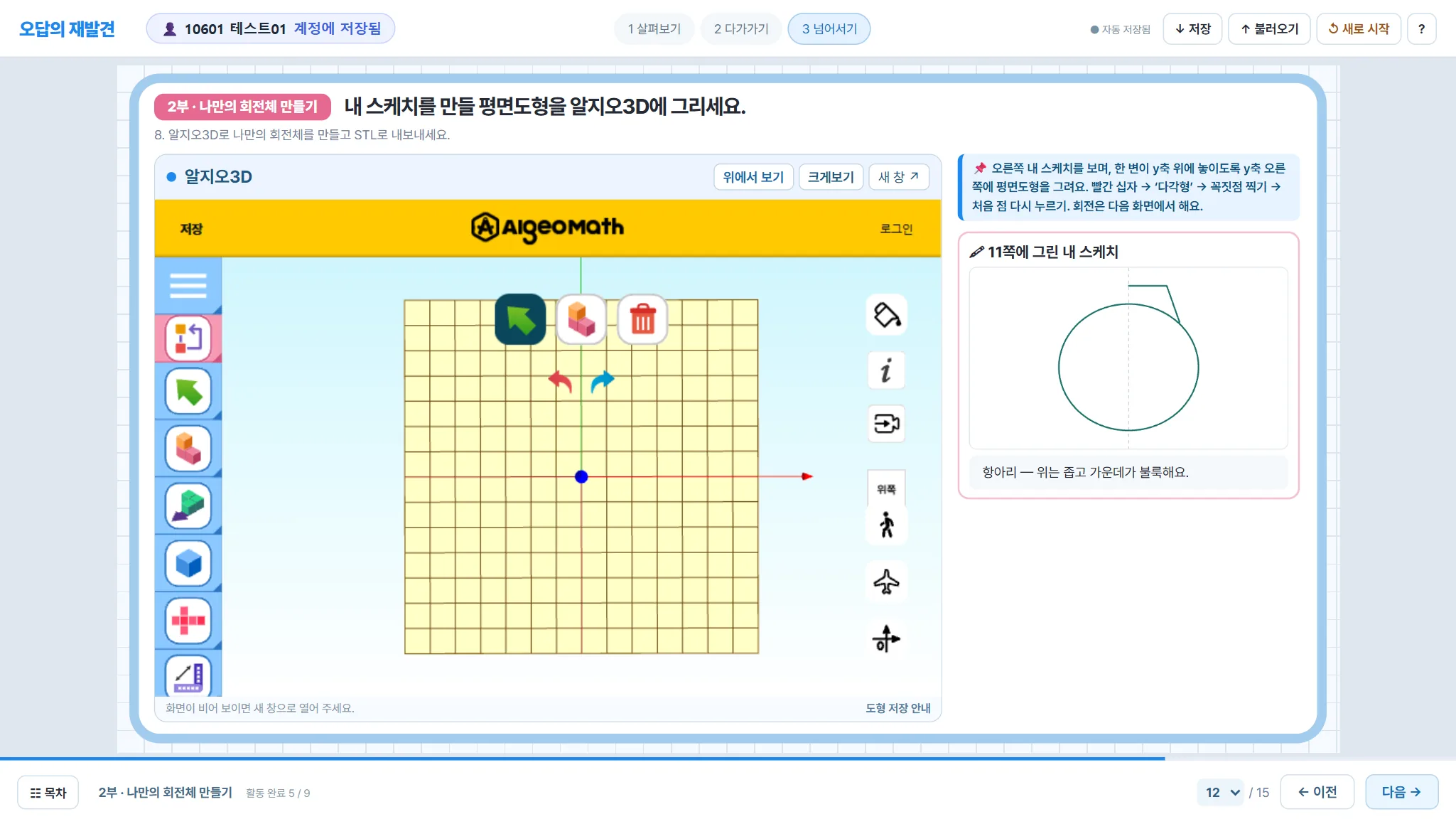
  • Finished models are uploaded inside the worksheet and appear in the class AR gallery for phones.완성 작품은 활동지에서 바로 올리고, 휴대폰 AR 갤러리에 반별로 모입니다.
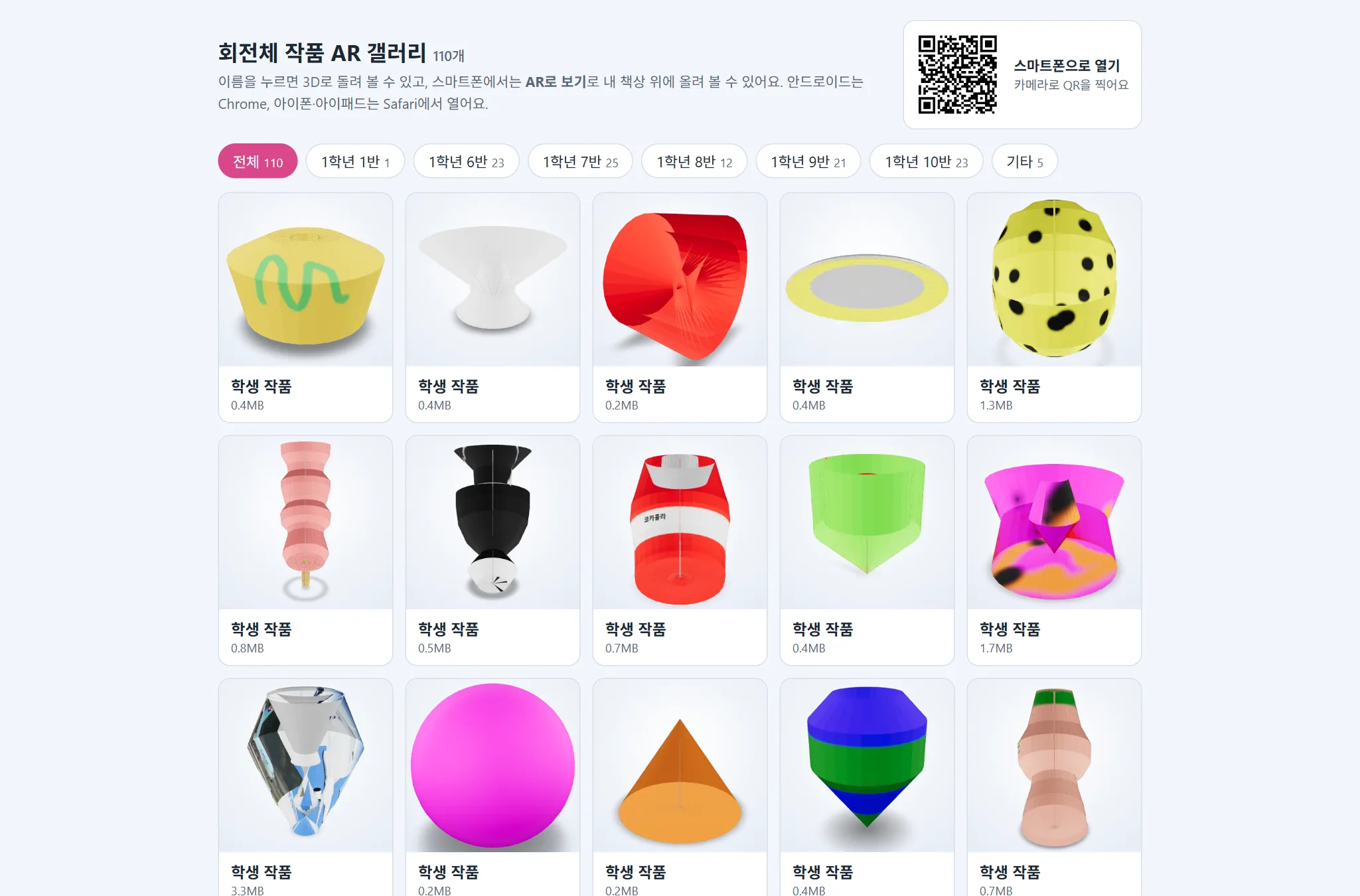
Ask a question — with a deliberate delay질문하기 — 일부러 늦게 답하는 AI

  • Students ask concept or problem questions (photos allowed). The AI answer is released only after a delay set by the teacher, so students keep thinking first.개념·문제 질문(사진 가능). AI 답은 교사가 정한 시간이 지난 뒤에 공개되어 학생이 먼저 더 생각합니다.
  • Teachers preview AI answers and can reply themselves.교사는 공개 전 AI 답을 미리 보고 직접 답글을 달 수 있습니다.
3Daily routines, motivation and AI support참여를 이끄는 장치와 AI 지원

Small daily routines keep students coming back to mathematics between lessons. Every routine feeds the same student record, so the teacher sees one connected picture of each learner.수업과 수업 사이에도 학생이 수학으로 돌아오게 하는 작은 일과들입니다. 모든 활동이 한 학생의 기록으로 이어져, 교사는 학생 한 명 한 명을 하나로 이어진 그림으로 봅니다.

🧩

Readiness check준비 진단

Before the unit, a 10-minute check on the elementary-school ideas it builds on (prisms and pyramids, cylinders, cones and spheres, nets). Short sets let students fill gaps one topic at a time; answers come with a reason and confidence (1–4).단원을 시작하기 전, 바탕이 되는 초등 내용(각기둥·각뿔, 원기둥·원뿔·구, 전개도)을 10분 안에 확인합니다. 주제별 짧은 묶음으로 빈 곳을 하나씩 메우고, 답마다 이유와 확신도(1~4)를 남깁니다.

📅

Attendance check출석 체크

One tap a day on the home screen. A stamp calendar shows the month, and every 5-day streak earns a bonus (weekends do not break a streak).첫 화면에서 하루 한 번 누릅니다. 출석 달력에 도장이 찍히고, 5일 연속마다 보너스가 붙습니다(주말은 연속을 끊지 않음).

🏅

Tiers (levels)등급제(티어)

Total points place each student in a game-style tier with its own emblem, plus 11 badges and a class Top 5.누적 포인트로 게임식 티어가 정해지고, 티어마다 엠블럼이 있습니다. 배지 11종과 우리 반 TOP 5도 함께 보입니다.

Bronze 0브론즈 0Silver 50실버 50Gold 150골드 150Platinum 300플래티넘 300Diamond 500다이아몬드 500Master 800마스터 800
🍪

Snack exchange간식 교환

Students spend points on a snack voucher. The teacher sets the item and price, hands out the snack, and confirms it in the app; every exchange is logged. Spending points never lowers a student's tier.모은 포인트로 간식 교환을 신청합니다. 교사가 품목·가격을 정하고, 간식을 준 뒤 앱에서 확인하면 기록이 남습니다. 포인트를 써도 티어는 내려가지 않습니다(누적 기준).

📔

Math diary수학 일기

A calendar linked to the school timetable (NEIS) shows each math lesson. Students rate the lesson and write four short parts: what they learned, what they did, how they felt and what they will try next. The teacher writes back.학교 시간표(나이스)와 연결된 달력에 수학 시간이 표시됩니다. 학생은 별점과 함께 배운 내용·나의 활동·느낀 점·앞으로를 쓰고, 교사가 답장합니다.

💬

Ask a question질문하기

Concept or problem questions at any time, with a photo of the problem if needed. The AI replies with hints rather than final answers, and the teacher can add a reply.언제든 개념 질문·문제 질문을 올립니다(문제 사진 가능). AI는 최종 답 대신 실마리를 주고, 교사도 답글을 달 수 있습니다.

Points reward effort, never correctness포인트는 정답이 아니라 참여와 노력에

A wrong answer earns exactly the same as a right one, so students are not afraid to write down what they really think. Points are calculated on the server from existing records; students cannot edit them. The teacher can add praise points with a reason.오답도 정답과 똑같이 점수를 받으므로, 학생은 틀릴 걱정 없이 진짜 생각을 적습니다. 포인트는 서버가 기존 기록으로 계산해 학생이 고칠 수 없고, 교사는 이유를 붙여 칭찬 포인트를 줄 수 있습니다.

Activity활동Points포인트
Daily attendance check출석 체크(하루 한 번)5
Every 5-day attendance streak5일 연속 출석마다+10
Today's quiz오늘의 퀴즈5
Readiness check준비 진단5
Pre / post diagnosis사전·사후 진단30
Each step of a live lesson / worksheet page실시간 수업 단계·활동지 쪽마다3
Finishing a lesson with reflection차시를 회고까지 마치면+10
Math diary entry수학 일기10

🤖 AI through an API: personal feedback for every student🤖 API로 연결한 AI: 학생마다 개별 피드백

The platform calls Google's Gemini model through its API from a secure server function. The key never reaches the student's browser.수업 시스템의 서버 함수가 구글 Gemini 모델을 API로 부릅니다. API 키는 학생 브라우저로 가지 않습니다.

Personal feedback after each lesson차시마다 개별 피드백

When a student finishes a lesson, the AI reads that student's own answers, reasons, confidence ratings and hand-drawn sketches, and writes feedback just for them: how their thinking changed from first to last, one specific thing they did well, anything still unclear, and one question to carry into the next lesson. The teacher can read every comment.학생이 차시를 마치면 AI가 그 학생의 답·이유·확신도·손그림을 읽고, 처음 생각과 마지막 생각의 변화, 잘한 장면 하나, 아직 헷갈리는 점, 다음 차시로 이어질 질문 하나를 담아 그 학생만을 위한 피드백을 씁니다. 교사도 모두 볼 수 있습니다.

Answers to students' questions학생 질문에 답하기

Questions from the 'Ask' page are answered by the AI with explanations and hints, not final answers. The answer is held back for a time set by the teacher so that students keep thinking first, and the teacher can preview it before release.질문하기에 올라온 질문에 AI가 설명과 실마리로 답합니다(최종 답은 주지 않음). 학생이 먼저 더 생각하도록 교사가 정한 시간 뒤에 공개되고, 교사는 공개 전에 미리 봅니다.

Follow-up dialogue after a diagnosis진단 뒤 되묻는 대화

After answering a diagnosis item, a student can talk it through with the AI. The first answer is locked before the dialogue starts, so the teacher always sees the student's own thinking, and the AI asks questions instead of telling.진단 문항에 답한 뒤 AI와 이야기할 수 있습니다. 대화 전에 처음 답이 고정되어 교사는 학생 본래의 생각을 보고, AI는 알려 주기보다 되묻습니다.

Class analysis for the teacher교사를 위한 반별 분석

With one click the teacher gets an AI summary of a class: main misconceptions, notable answers and suggestions for the next lesson. Only aggregated data and short excerpts without names are sent.교사가 한 번 누르면 반 전체 기록을 AI가 정리합니다: 두드러진 오개념, 눈여겨볼 답, 다음 수업 제안. 집계와 이름을 뺀 짧은 글만 보냅니다.

4What the teacher sees during the lesson수업 중 교사 화면

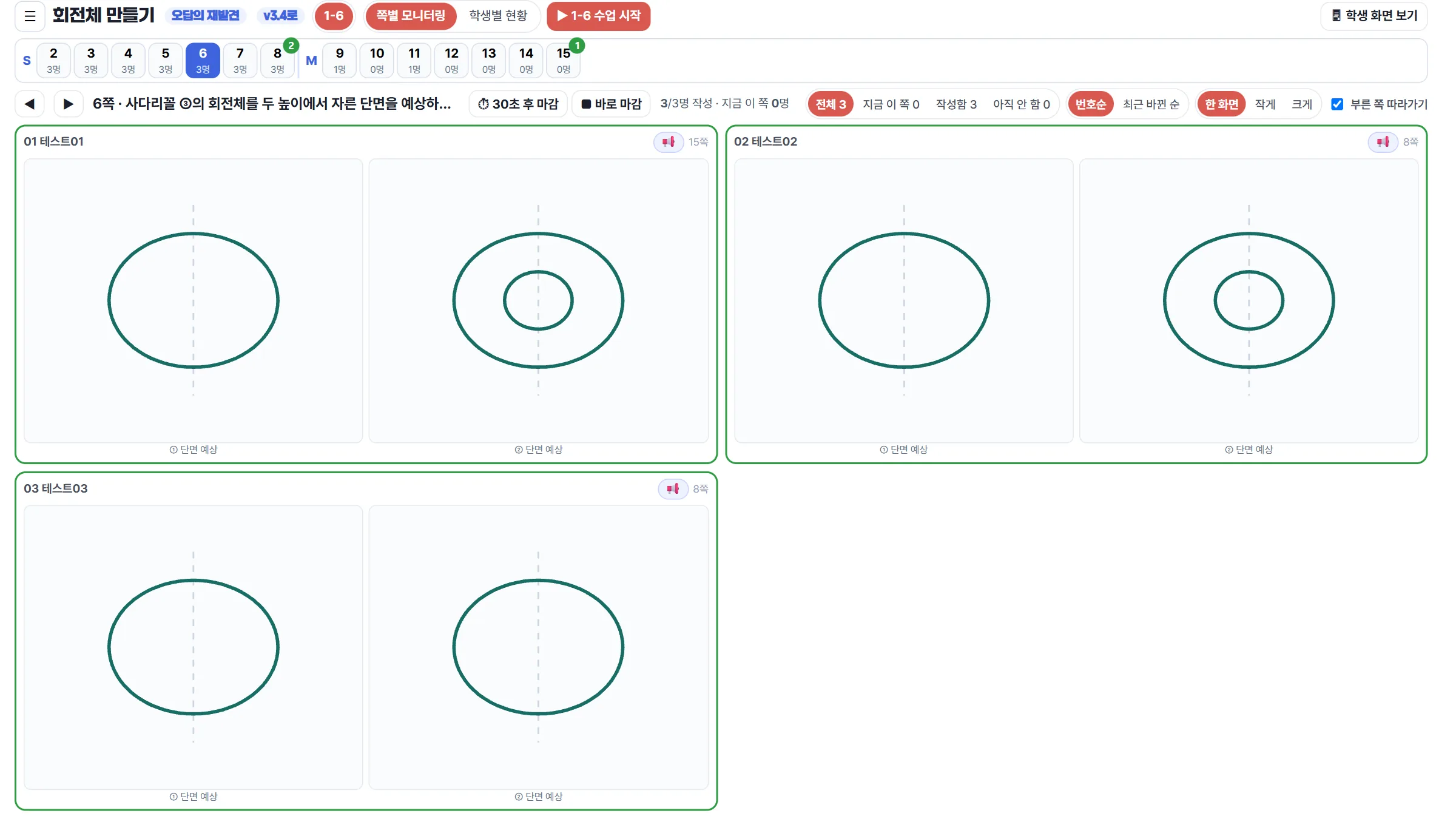
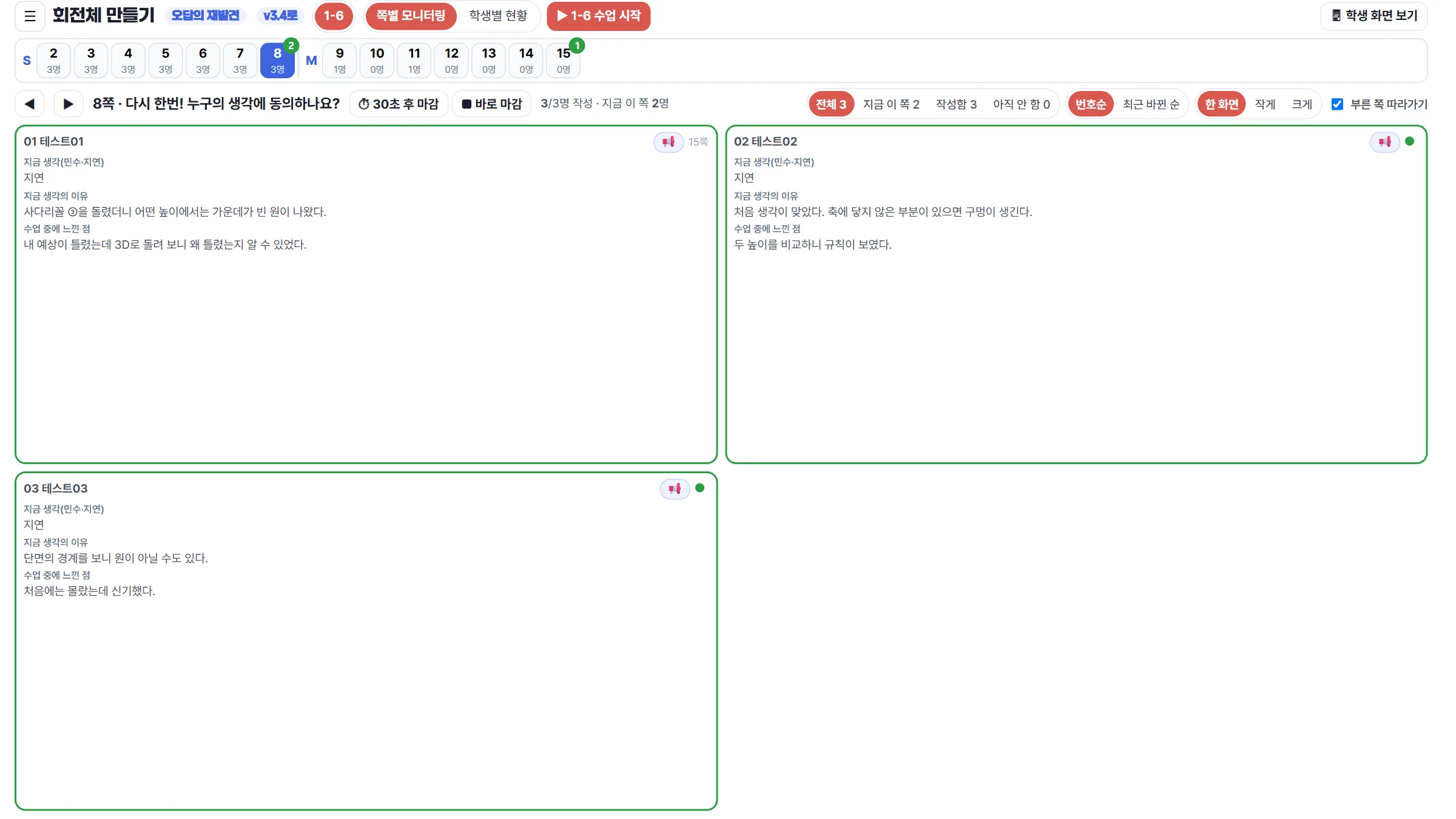
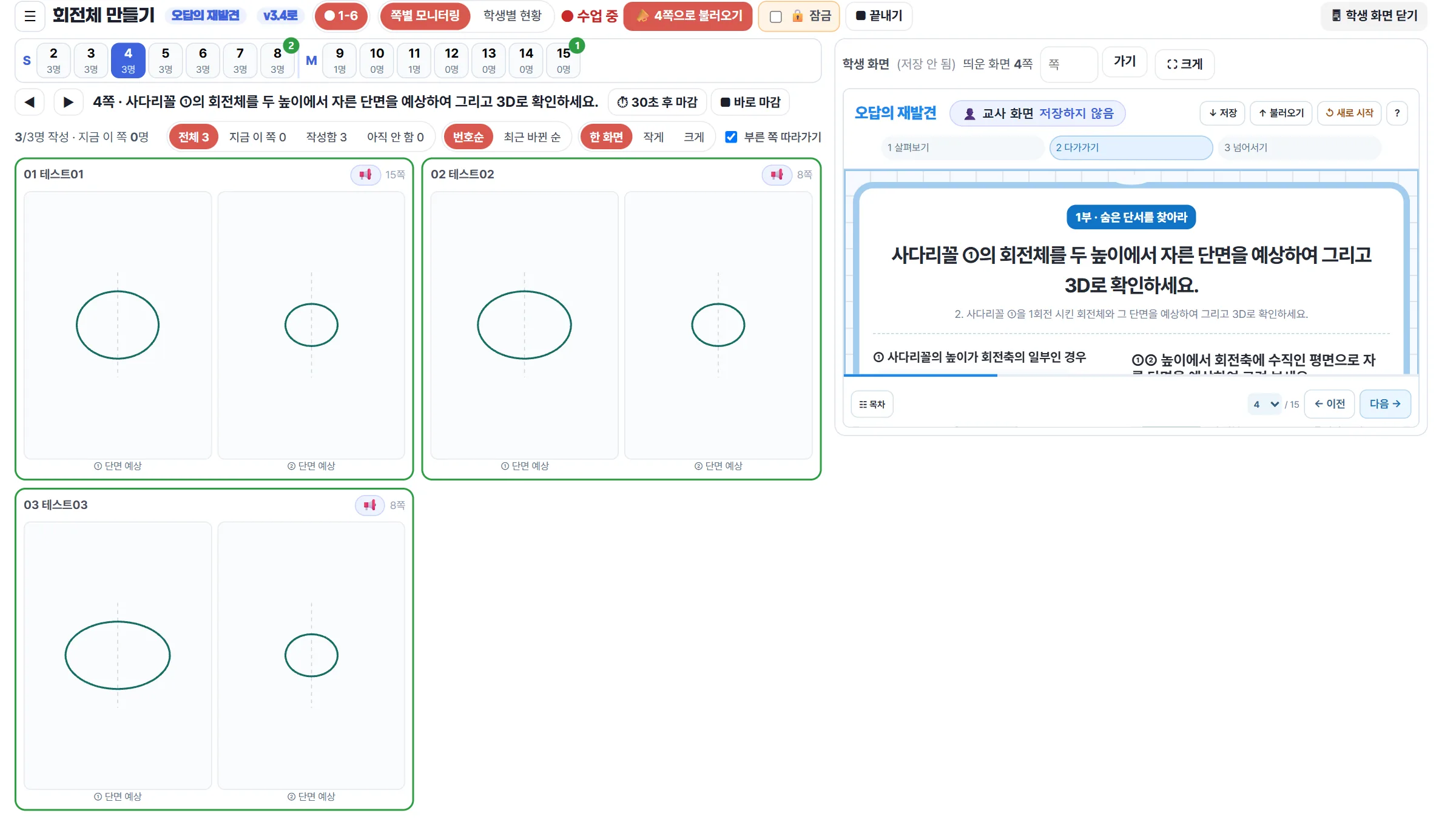
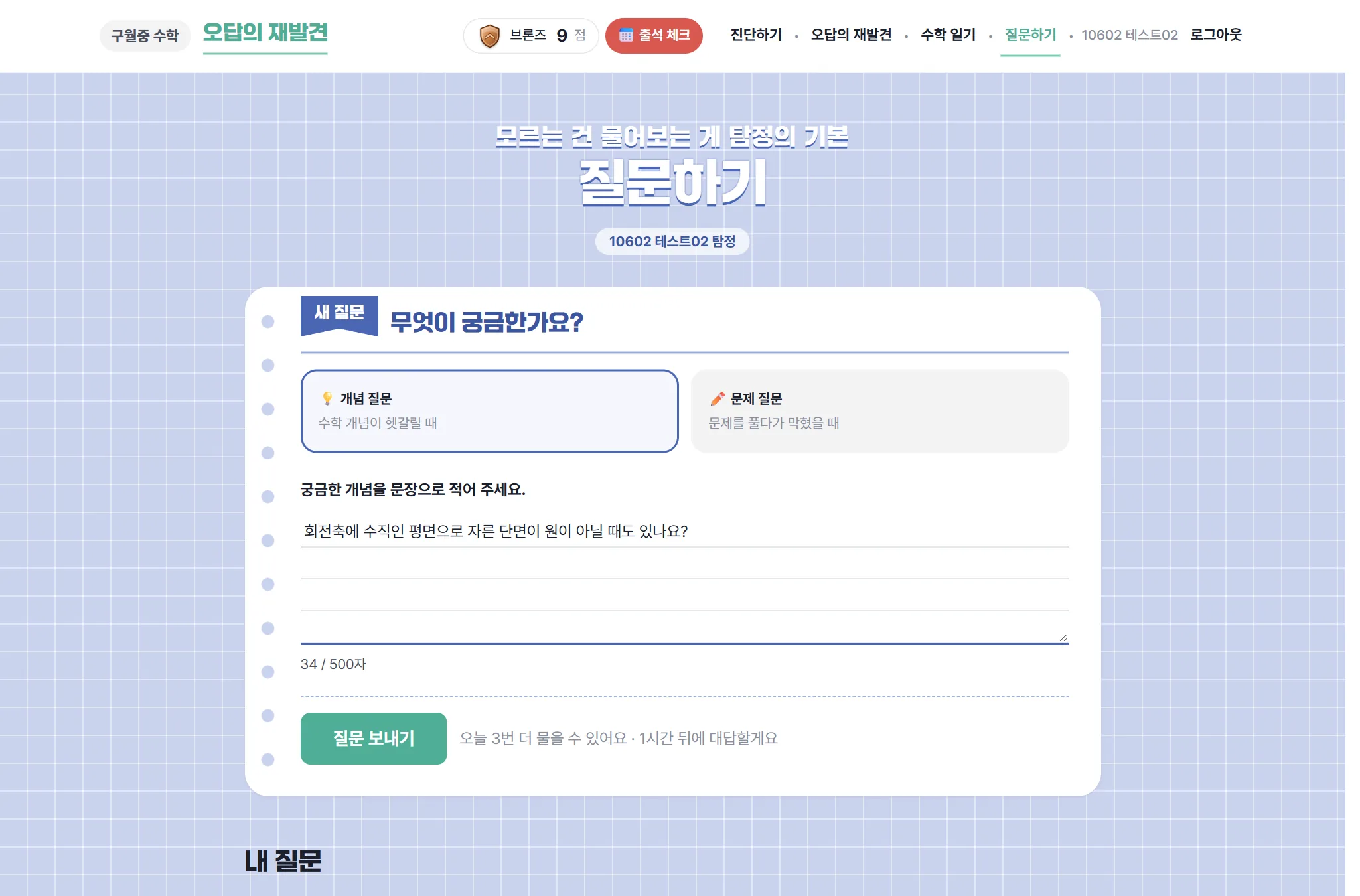
Page-by-page monitoring on one screen: every student's drawing or answer appears as a card the moment it changes. The teacher can call the class to a page, lock it, close answers, and share selected answers on the board.쪽별 모니터링: 학생의 그림과 답이 바뀌는 순간 카드로 보입니다. 학생 불러오기·잠금·답 마감, 고른 답을 칠판에 공유할 수 있습니다.

P.6Predicted cross-sections, side by side학생들의 단면 예상 그림을 한눈에Who expected a ring, who expected a full disc — before the 3D check.3D 확인 전, 누가 고리를·누가 꽉 찬 원을 예상했는지.
P.8Second vote with reasons and reflections다시 생각 — 이유와 느낀 점
LIVELesson bar + the student screen on the right수업 막대 + 오른쪽 학생 화면
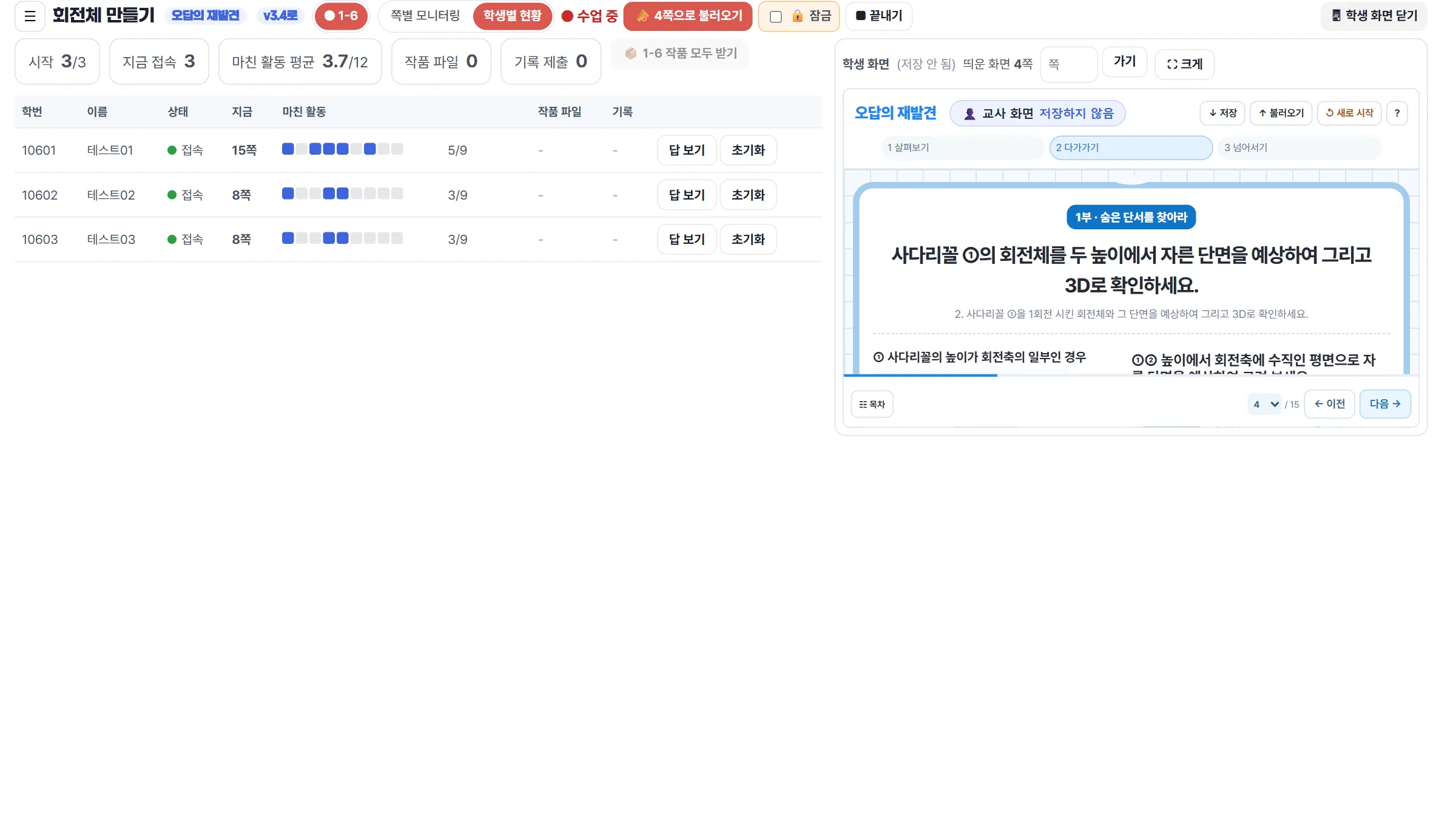
LIVEStudent overview: page, progress, files학생별 현황: 지금 쪽·진행·작품 파일

Monitoring features모니터링 기능 안내

🗺️

Page map쪽 지도

A strip of page buttons shows, for every page, how many students have done it and how many are on it right now.쪽 단추마다 그 쪽을 한 학생 수와 지금 그 쪽에 있는 학생 수가 보입니다.

🧑‍🎓

Live student cards실시간 학생 카드

Answers and drawings appear while students are still writing. A "just now" tag marks fresh changes, a dot shows who is on this page, and "other tab" shows who has left the worksheet.쓰는 중인 답과 그림이 바로 보입니다. 방금 바뀐 카드에 "방금", 지금 이 쪽에 있는 학생에 점, 활동지를 벗어난 학생에 "다른 탭" 표시.

🔍

Views for drawing pages그림 쪽 보기

On drawing pages the cards show only the sketches, large; clicking a student opens everything they wrote. Sort by number or by latest change; fit all cards on one screen, small or large.그림 쪽에서는 카드에 그림만 크게 보이고, 학생을 누르면 쓴 글까지 펼쳐집니다. 번호순·최근 바뀐 순 정렬, 한 화면·작게·크게.

📣

Call and lock불러오기·잠금

Bring the whole class to the current page with one button. While locked, students stay on that page and move together with the teacher's ◀ ▶.단추 하나로 모두를 지금 쪽으로 부릅니다. 잠그면 학생은 그 쪽에 머물고, 교사의 ◀ ▶에 맞춰 함께 넘어갑니다.

⏱️

Close answers답 마감

Close a page immediately, or after a 30-second countdown shown on student screens. Students can still move on; they just cannot edit that page.바로, 또는 학생 화면에 30초 카운트다운을 띄운 뒤 그 쪽 답을 마감합니다. 다른 쪽으로는 계속 갈 수 있습니다.

📢

Share on every screen모두에게 공유

Pick one answer or drawing and show it on all student screens, with or without the name ("Answer 1, Answer 2").고른 답이나 그림을 반 학생 모두의 화면에 띄웁니다. 이름을 숨기면 "답 1, 답 2"로 보입니다.

🖥️

Student view beside the monitor옆에 띄우는 학생 화면

The same worksheet students see opens on the right for the projector; turning pages there moves the monitor (and, when locked, the class) too.학생과 같은 활동지 화면을 오른쪽에 띄워 칠판에 보여 줍니다. 거기서 쪽을 넘기면 모니터도 (잠금 중이면 학생도) 함께 넘어갑니다.

📋

Student overview학생별 현황

Current page, activities finished, whether the AlgeoMath figure was really rotated and whether the 3D model file was submitted.지금 있는 쪽, 마친 활동, 알지오3D에서 실제로 회전시켰는지, 작품 파일을 제출했는지 한 줄로 봅니다.

🛡️

Fair records기록 보호

A prediction locks once the 3D check is opened, so the record keeps the student's real first idea. The teacher can reset one student's record if something goes wrong.3D 확인을 열면 예상 그림이 잠겨 처음 생각이 그대로 남습니다. 문제가 생기면 교사가 한 학생의 기록만 초기화할 수 있습니다.

5What changed in students' thinking학생 생각의 변화

From the platform records of Grade 7 classes 6–10 (151 students), as of 5 Nov 2026. No names or IDs.1학년 6~10반(151명) 앱 기록, 2026. 11. 5. 기준. 이름·학번 없이 집계.

89students took the pre-diagnosis명 회전체 사전 진단 제출
106joined live lesson 1 "Who is right?"명 1차시 「무엇이 맞을까?」 참여
140used the rotation-solid web worksheet명 회전체 만들기 웹 활동지 참여
124rotated a figure themselves in AlgeoMath 3D명 알지오3D로 평면도형을 직접 돌려 봄

Same question, before and after the counter-example (n = 93, answered both times)반례 전후 같은 질문(두 번 모두 답한 93명)

First thought처음 생각
58%
40%
Thinking again다시 생각
27%
69%
Minsu: "always a circle" (misconception)민수: "항상 원" (오개념)Jiyeon: "may not be a circle" (correct)지연: "원이 아닐 수도" (정답)Neither둘 다 아님

40% → 69% chose the correct view after meeting a counter-example (a right triangle touching the axis at one vertex, whose solid has a hollow cross-section). During the lesson, 76% of 105 students judged that "a cross-section with a hole is not a circle".반례(꼭짓점 하나만 축에 닿은 직각삼각형 → 가운데가 빈 단면)를 만난 뒤 정답 선택이 40% → 69%. 수업 중 105명 가운데 76%가 "가운데가 빈 단면은 원이 아니다"라고 판단했습니다.

A student's own words (original, translated)학생 글(원문 그대로)"If part of the figure does not touch the rotation axis, the cross-section perpendicular to the axis can have a hole in the middle; if every part touches it, there is no hole.""회전축에 안 닿아있는 부분이 있으면 회전축에 수직인 평면으로 잘랐을 때 만들어지는 단면에 가운데에 구멍이 생길 수 있고 회전축에 안 닿아있는 부분 없이 다 닿아있으면 구멍이 나지 않는다"
  • Lesson 1 data covers four classes (106 students); class 9 had no lesson-1 record.1차시 기록은 9반이 없어 4개 반(106명) 기준입니다.
  • Only students who reached "thinking again" are in the before/after comparison, which may favour those who finished.‘다시 생각’까지 답한 학생만 비교에 들어가 끝까지 간 학생 쪽으로 기울 수 있습니다.
  • "Minsu" and "Jiyeon" are fictional characters in the task.‘민수·지연’은 문항 속 가상 인물입니다.

6Today's lesson at a glance오늘 수업 한눈에 보기

"Find the hidden clue, then design your own solid of revolution." Every student works on a laptop; the teacher leads the class page by page.「숨은 단서를 찾고 나만의 회전체 만들기」. 학생은 노트북으로 활동하고, 교사는 쪽 단위로 수업 흐름을 이끕니다.

0–15′

Part 1 · Who is right?1부 · 누구의 말이 맞을까?

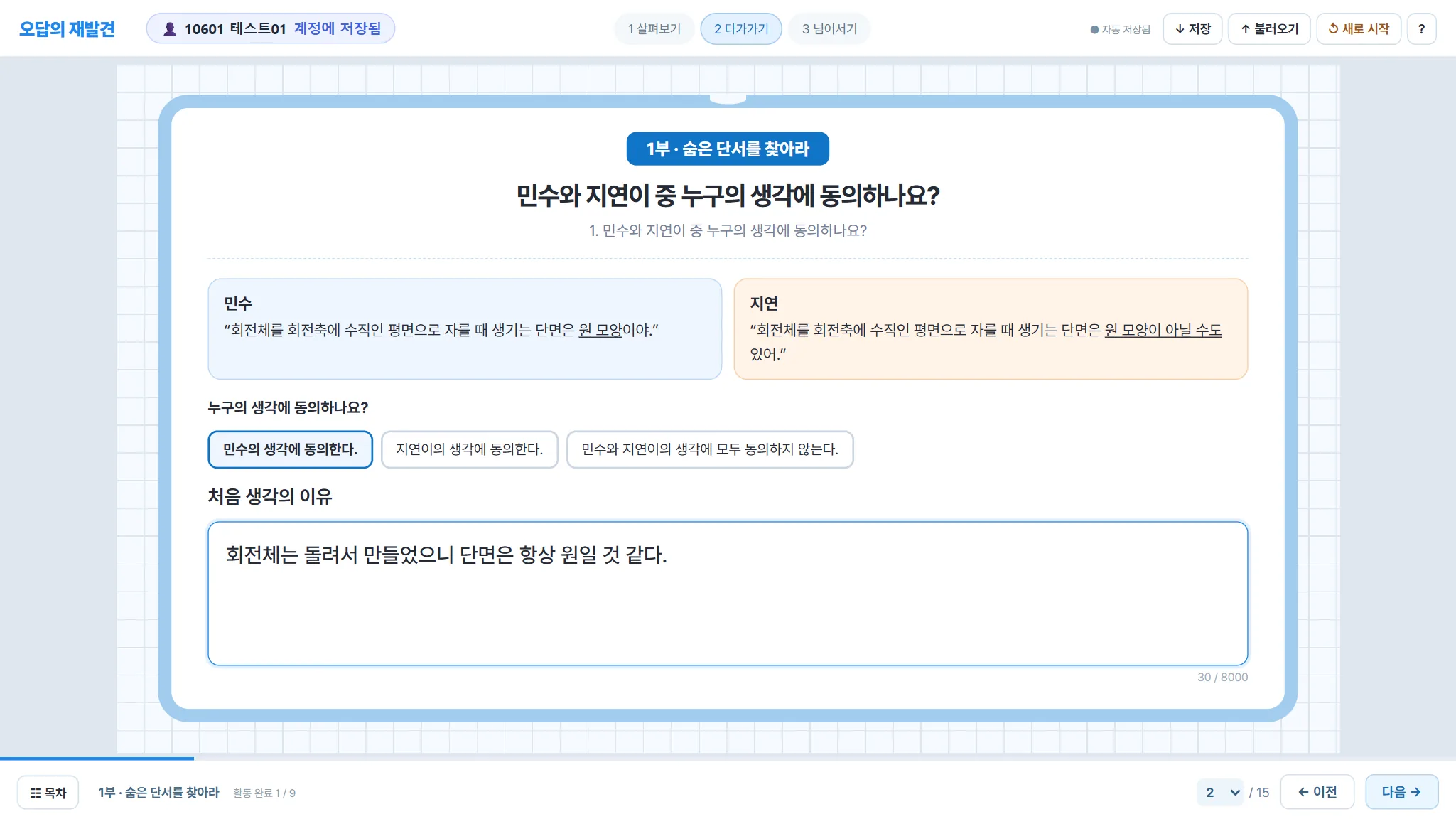
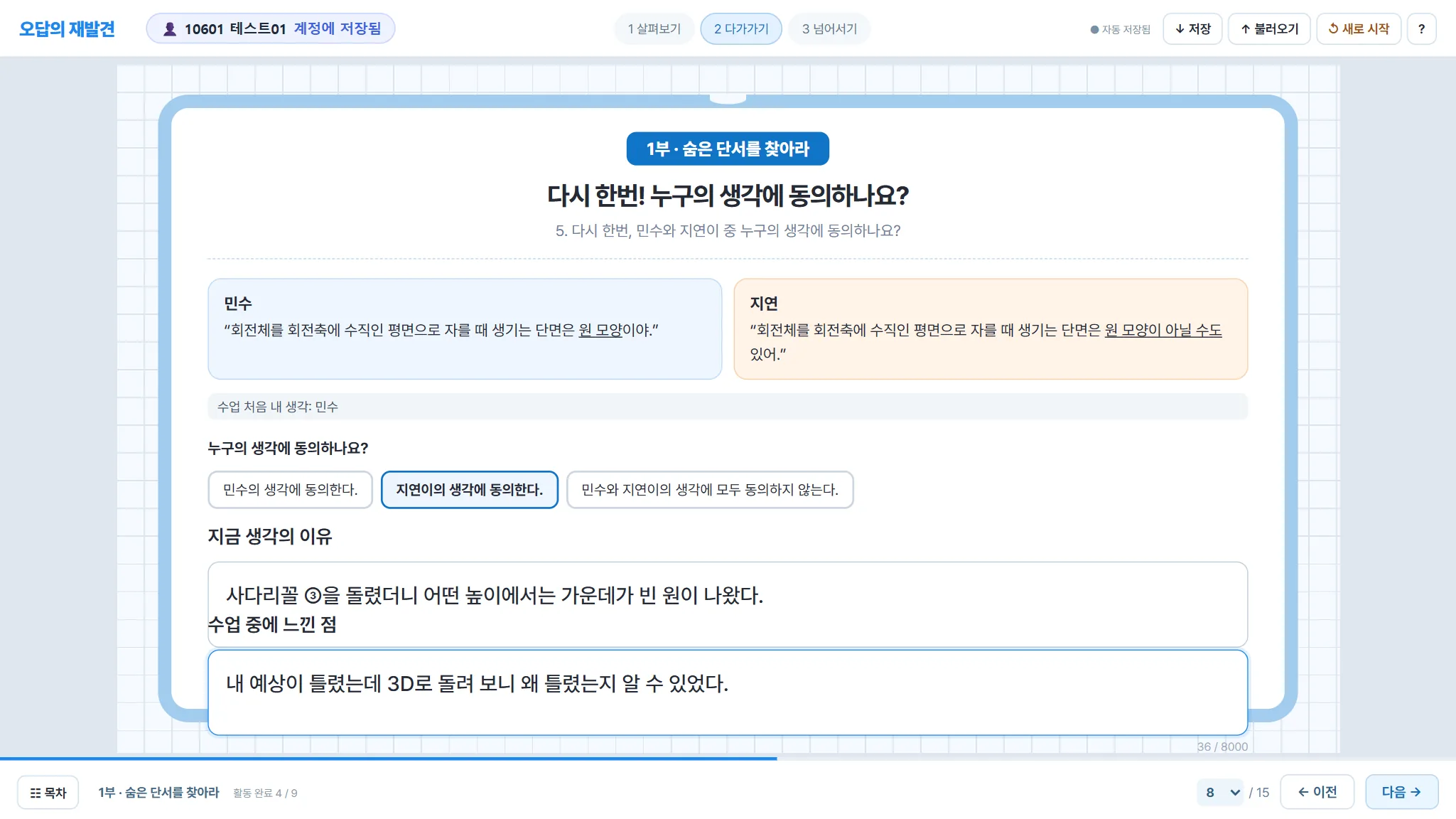
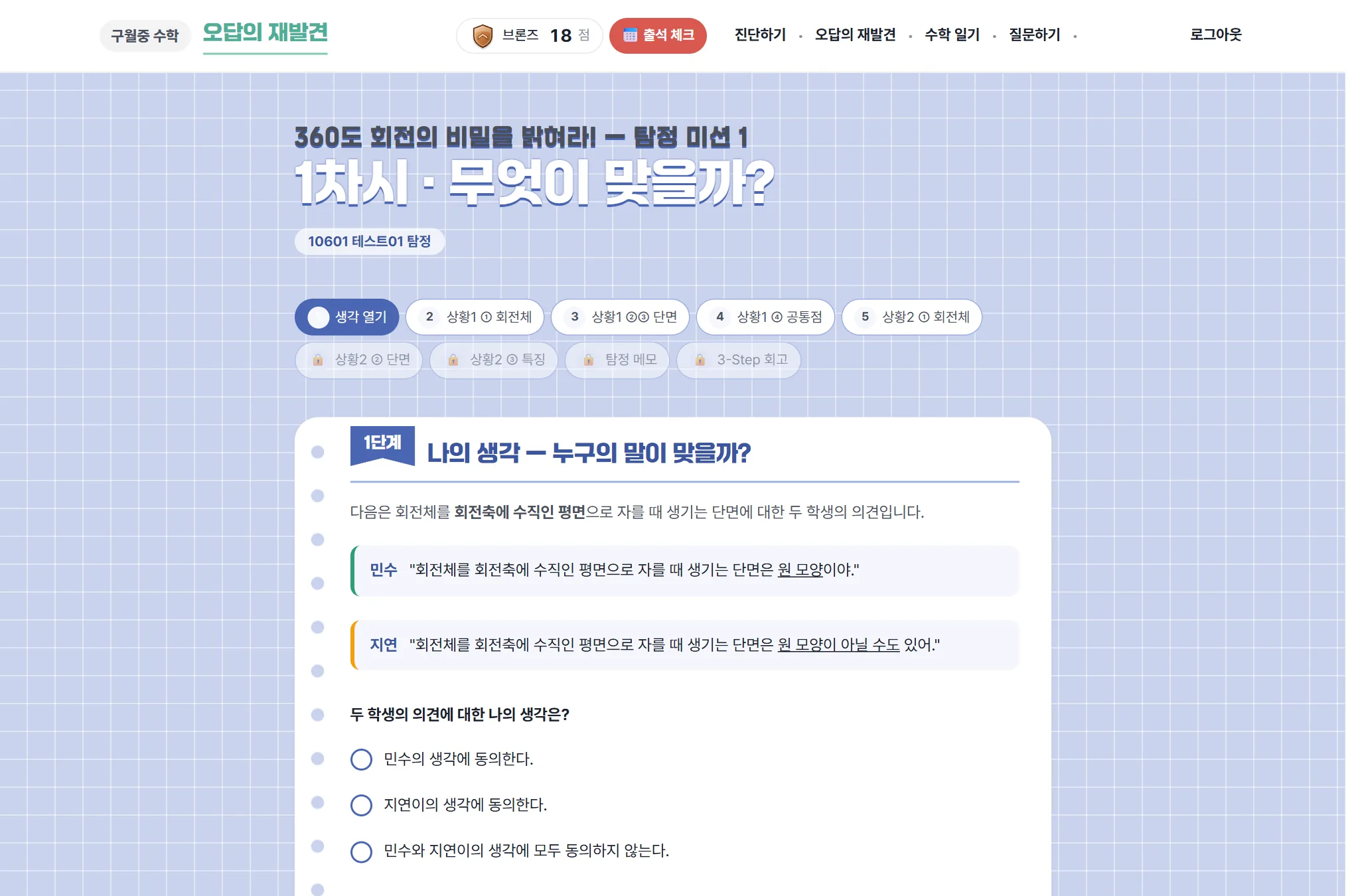
  1. Two claims: Minsu says the cross-section perpendicular to the axis is always a circle; Jiyeon says it may not be. Students vote and give a reason.민수: "회전축에 수직인 평면으로 자른 단면은 원이다." 지연: "원이 아닐 수도 있다." 누구에게 동의하는지 고르고 이유 쓰기
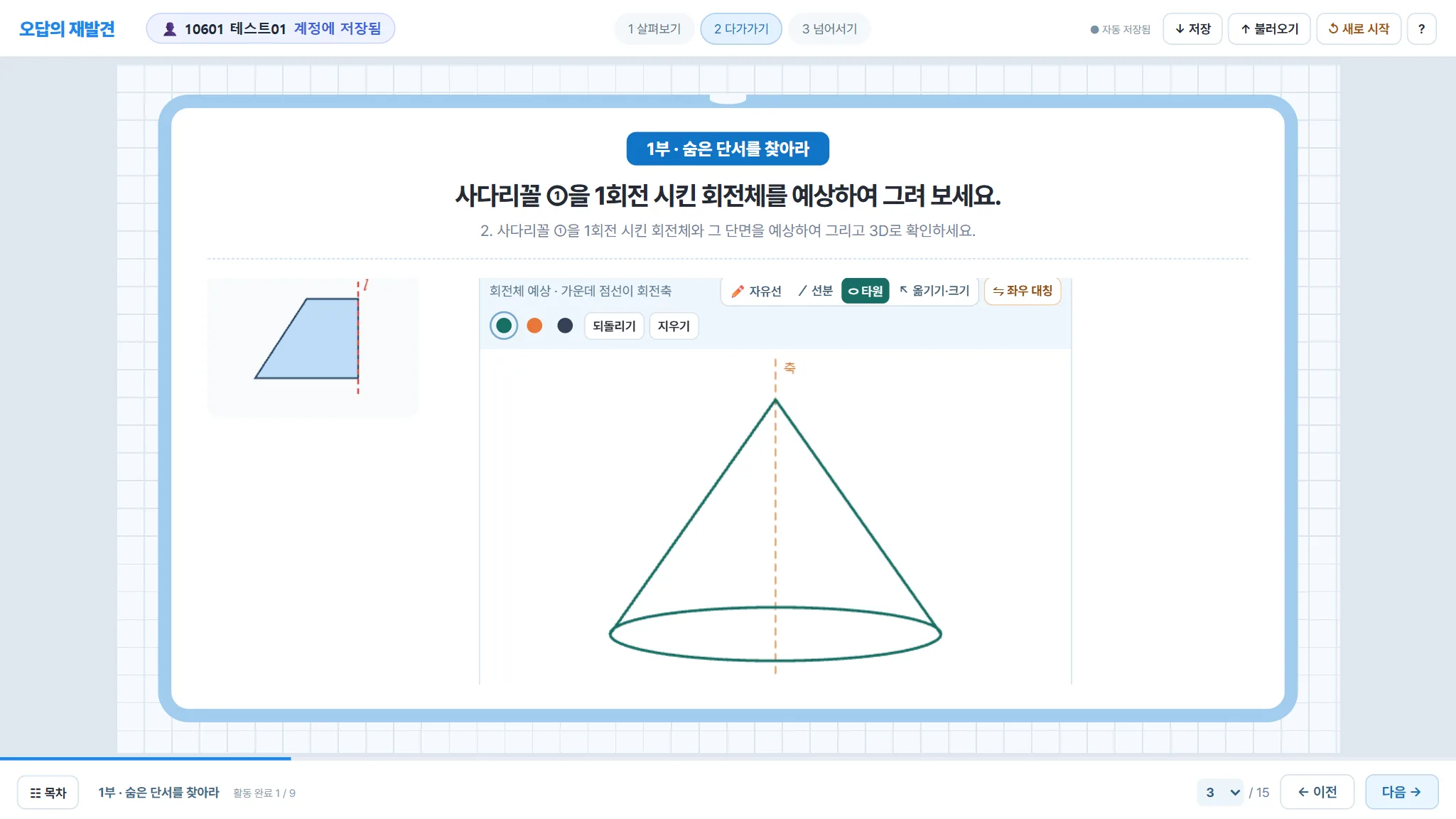
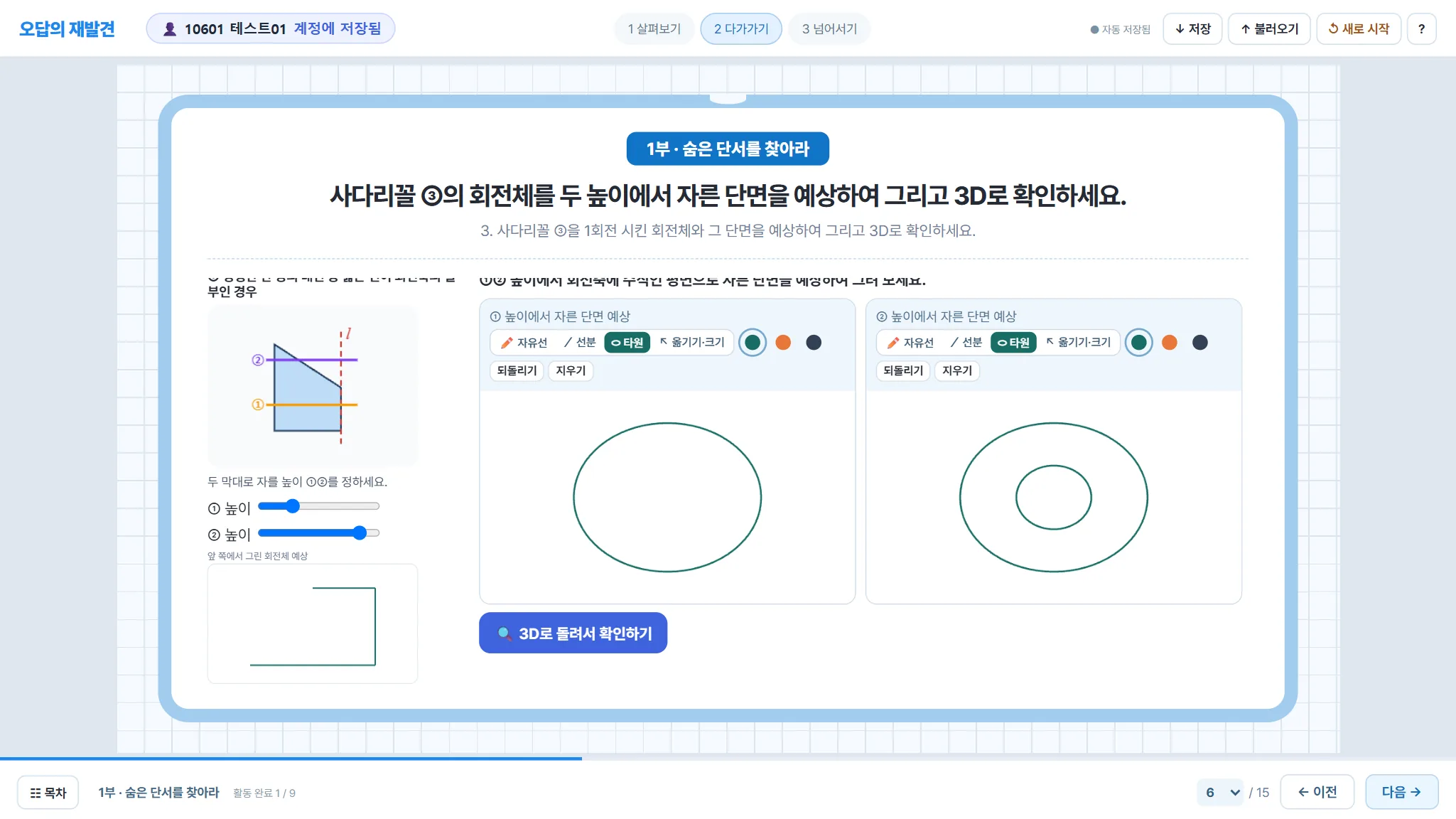
  2. For two trapezoids, students sketch the predicted solid, then sketch the cross-sections at two heights they choose.사다리꼴 두 개로 회전체를 예상해 그리고, 직접 고른 두 높이에서 자른 단면을 예상해 그리기
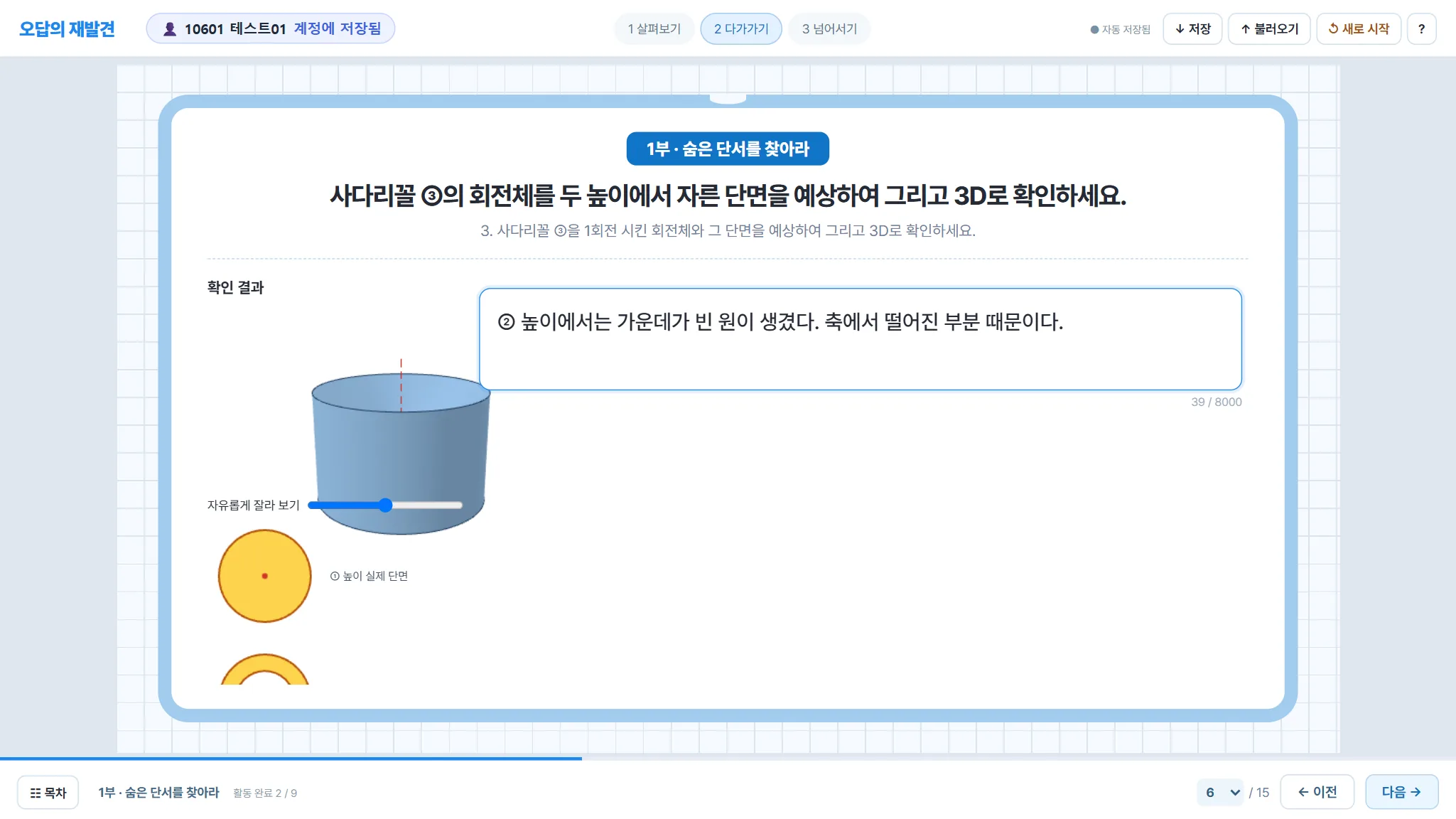
  3. Check in 3D: the solid is swept 360° and cut at the chosen heights.3D로 확인: 360° 돌려 회전체를 만들고 고른 높이에서 잘라 보기
≈15′

The hidden clue숨은 단서

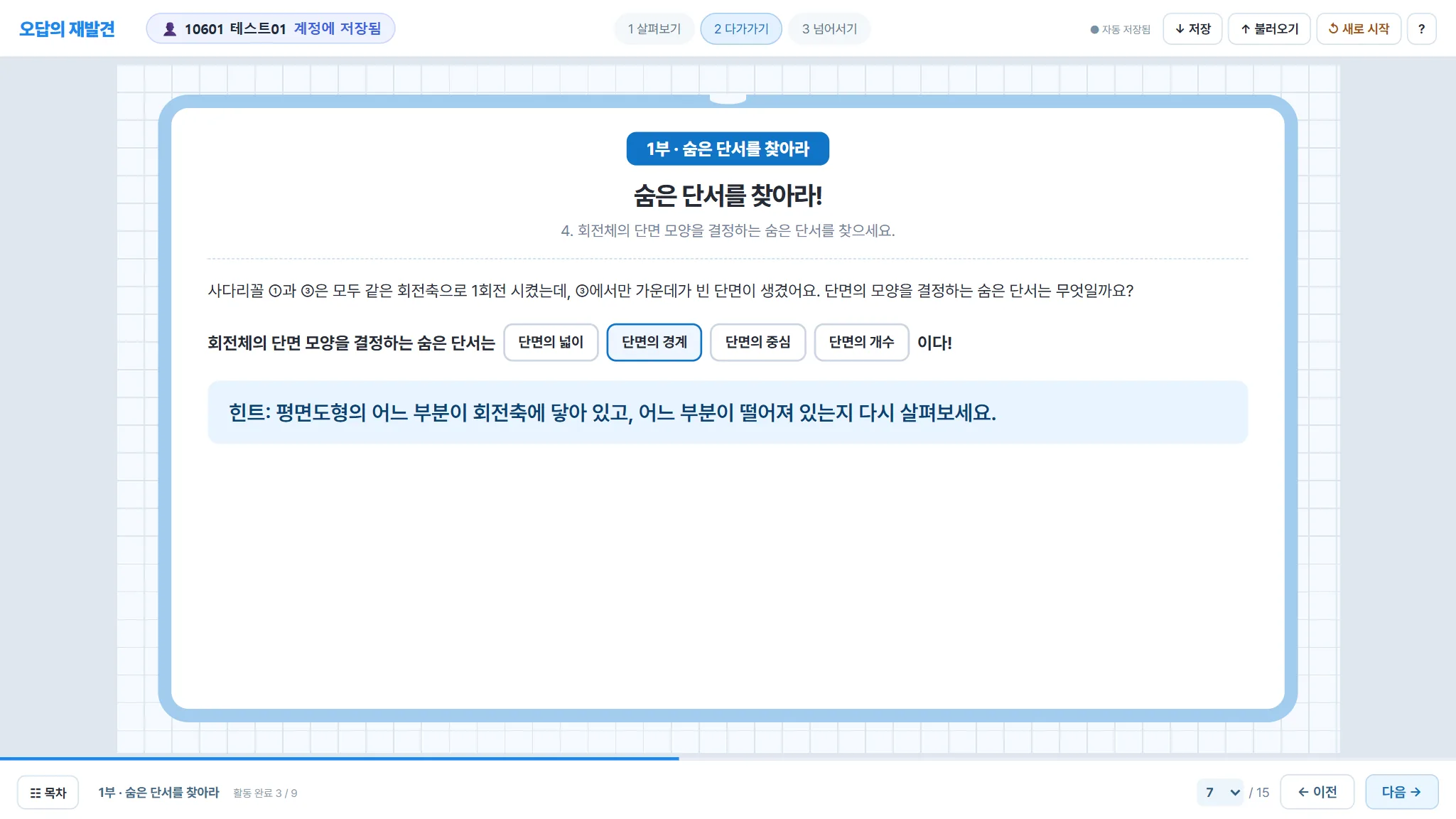
  1. What decides the shape of the cross-section? → the boundary of the cross-section (which parts touch the axis).단면 모양을 결정하는 것은? → 단면의 경계(평면도형의 어느 부분이 축에 닿아 있는가)
  2. Vote again on the same question and write what they felt. The class sees how many minds changed.같은 질문에 다시 답하고 느낀 점 쓰기 — 생각이 얼마나 바뀌었는지 바로 보입니다
15–45′

Part 2 · Make your own2부 · 나만의 회전체 만들기

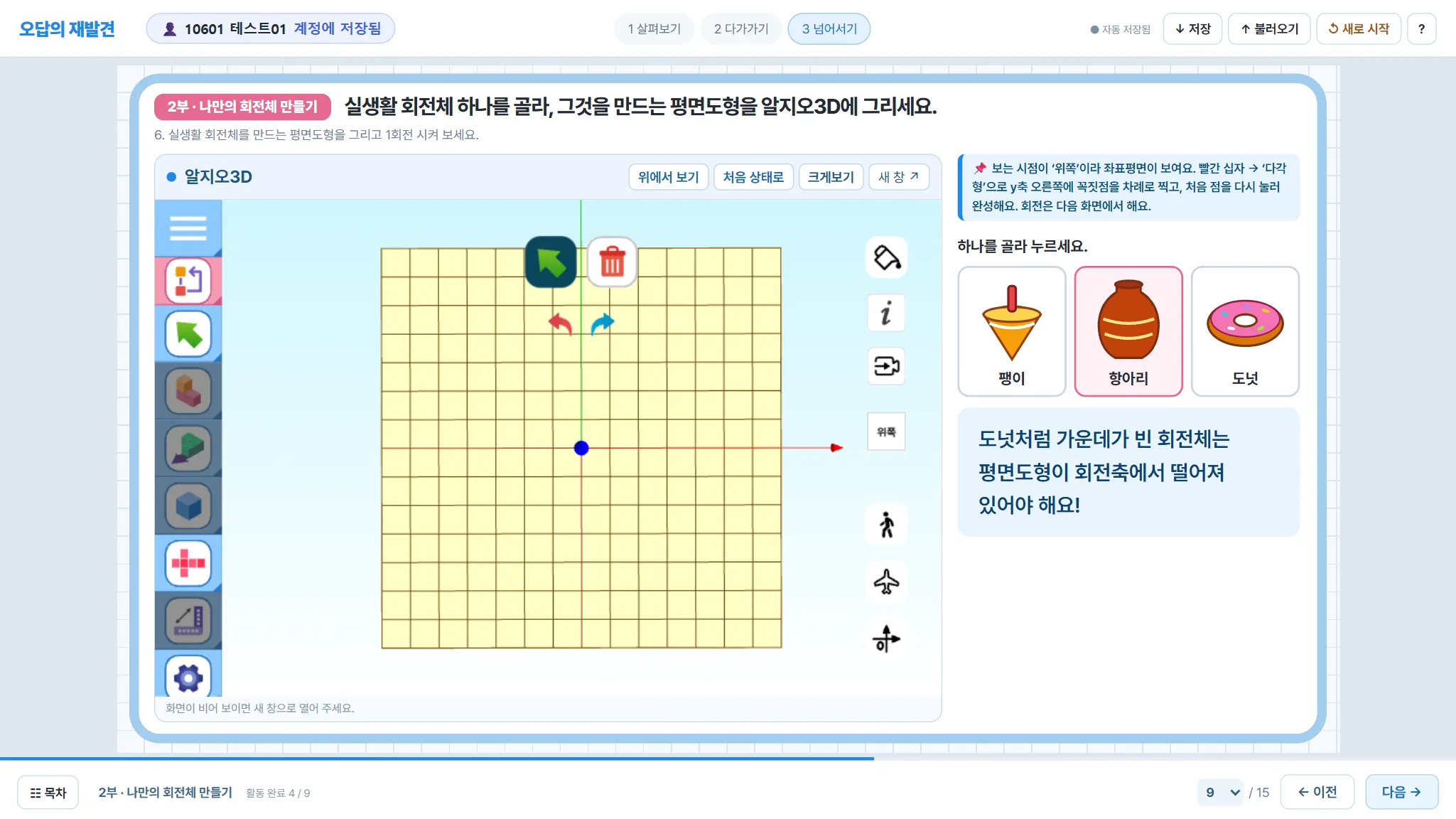
  1. Pick an everyday object (spinning top, jar, doughnut) and draw the plane figure that makes it in AlgeoMath 3D.팽이·항아리·도넛 중 하나를 골라 그 회전체를 만드는 평면도형을 알지오3D에 그리기
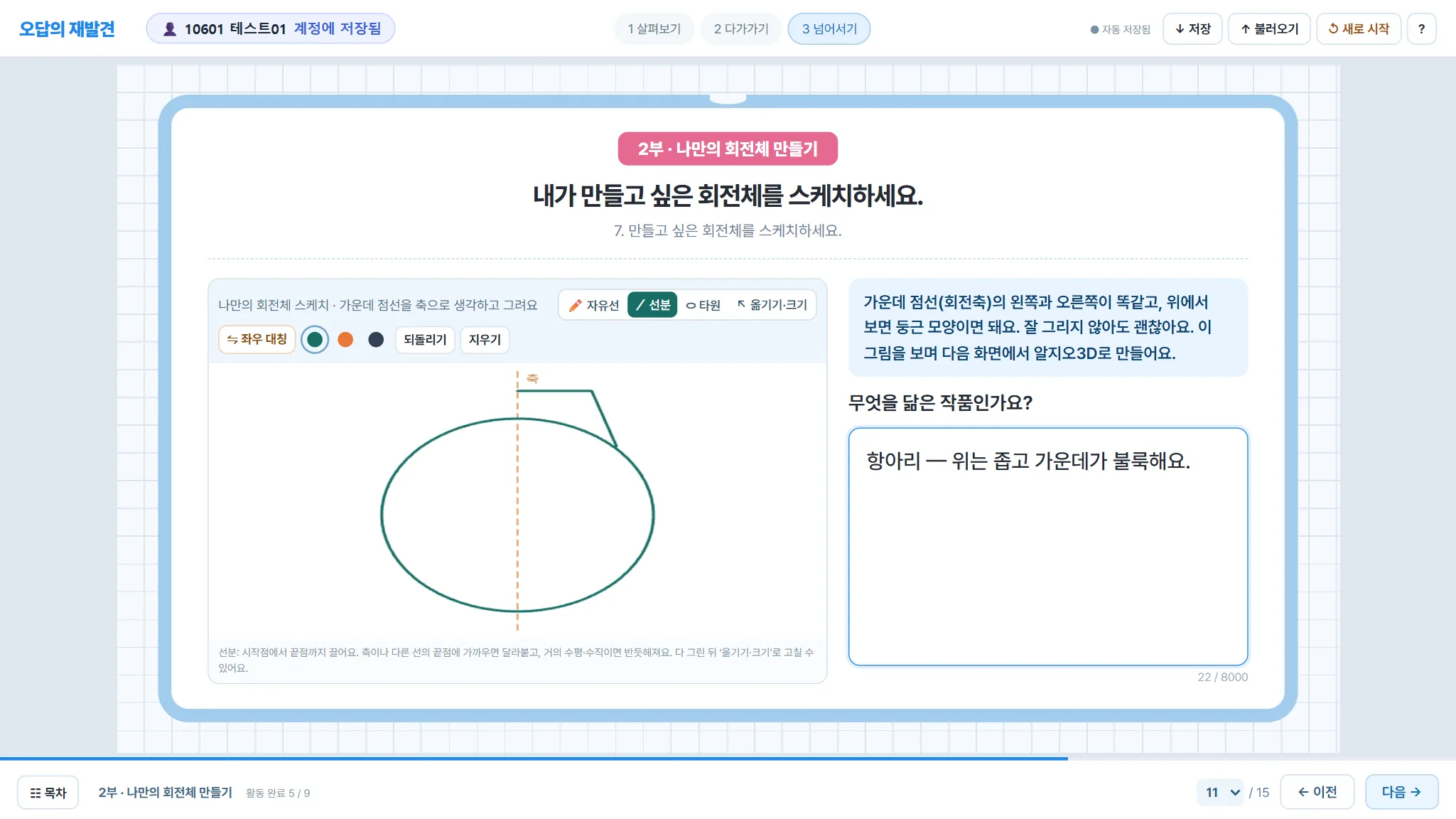
  2. Sketch an original design, build it in AlgeoMath 3D (the sketch stays on screen), export STL.나만의 회전체 스케치 → 알지오3D로 제작(스케치가 옆에 늘 보임) → STL 내보내기
  3. Colour it in Paint 3D (teacher-made web app), upload, and see it in the class AR gallery on a phone.그림판3D(교사 제작 웹앱)로 색칠 → 활동지에서 바로 제출 → 휴대폰 AR 갤러리에서 함께 보기

📋 Lesson plan for today (45 minutes)📋 오늘 공개 수업 계획(45분)

Learning goal 1 · Concept학습 목표 1 · 개념Check in 3D and explain that a cross-section of a solid of revolution cut by a plane perpendicular to the axis is not always a full circle, but its boundary is always a circle.회전체를 회전축에 수직인 평면으로 자른 단면이 항상 꽉 찬 원은 아니지만, 그 경계는 언제나 원임을 3D로 확인하고 설명한다.
Learning goal 2 · Making학습 목표 2 · 만들기Find the plane figure that generates an everyday solid of revolution, then design and build an original one.실생활 회전체를 만드는 평면도형을 찾고, 나만의 회전체를 설계하고 만든다.
Learning goal 3 · Attitude학습 목표 3 · 태도Write down a first idea, test it with evidence and change their mind when the evidence says so.처음 생각을 기록하고, 근거로 확인하고, 근거가 말하면 생각을 고친다.
Time시간
Page쪽
Student activity학생 활동
Teacher · what is monitored교사 · 모니터링 포인트
0–2′
P.1
Today's mission: sign in and read the question of the day.오늘의 미션: 로그인하고 오늘의 탐구 질문 읽기
Call the whole class to page 1 and lock it; check that everyone is connected.모두를 1쪽으로 불러 잠그고, 접속하지 않은 학생 확인
2–5′
P.2
First vote: Minsu ("always a circle") or Jiyeon ("maybe not")? Write a reason.처음 생각: 민수("항상 원") / 지연("아닐 수도") 고르고 이유 쓰기
See the split of votes as answers arrive; pick one or two reasons to share on screen (names hidden).들어오는 답으로 의견 분포 확인, 이유 한두 개를 이름 없이 화면에 공유
5–11′
P.3–6
For trapezoids ① and ③: sketch the predicted solid, choose two cutting heights, sketch both cross-sections, then check in 3D.사다리꼴 ①·③: 회전체 예상 그림 → 두 높이 단면 예상 그림 → 3D로 돌려서 확인
Cards show every sketch large: who expects a full disc, who expects a ring. The 3D check is locked until both sketches exist, so predictions are honest.카드에 학생 그림이 크게 보임: 꽉 찬 원 / 고리를 예상한 학생 구분. 두 그림을 다 그려야 3D가 열려 예상이 먼저 남음
11–15′
P.7–8
The hidden clue: the boundary of the cross-section. Vote again and write what you felt.숨은 단서: 단면의 경계. 같은 질문에 다시 답하고 느낀 점 쓰기
Compare first and second votes; share a student who changed their mind and why.처음·다시 생각 비교, 생각을 바꾼 학생의 글을 공유
15–22′
P.9–10
Choose an everyday solid (top, jar, doughnut) and draw its plane figure in AlgeoMath 3D; rotate it and compare.실생활 회전체(팽이·항아리·도넛)를 골라 평면도형을 알지오3D에 그리고 1회전 시켜 비교
Snapshot of each AlgeoMath screen; a "rotated" mark shows who has actually turned a figure.알지오3D 화면 사진과 "회전시킴" 표시로 실제로 돌려 본 학생 확인
22–33′
P.11–13
Sketch an original solid with its axis, build it in AlgeoMath 3D (sketch stays on the right), export STL.나만의 회전체 스케치 → 알지오3D로 제작(스케치가 오른쪽에 보임) → STL 내보내기
Sketch cards side by side; walk to students who are still on an earlier page.스케치 카드를 한눈에 비교, 앞 쪽에 머문 학생에게 다가가 돕기
33–41′
P.14–15
Colour it in Paint 3D, save GLB, upload inside the worksheet.그림판3D로 색칠 → GLB 저장 → 활동지 안에서 제출
Student overview shows who has submitted a file.학생별 현황에서 작품 파일 제출 여부 확인
41–45′
—
Wrap-up: look at classmates' works in the AR gallery on phones; write the math diary after class.정리: 휴대폰 AR 갤러리로 친구 작품 감상, 수업 뒤 수학 일기 쓰기
Share the gallery QR; close answers for the lesson.갤러리 QR 공유, 답 마감

Timing is a plan; the teacher adjusts the pace from the monitoring screen. Points keep accumulating as in every lesson (3 points per page, 10 for submitting a work).시간은 계획이며, 교사가 모니터링 화면을 보며 속도를 조절합니다. 포인트는 평소 수업처럼 쌓입니다(쪽마다 3점, 작품 제출 10점).

P.2First vote: Minsu or Jiyeon?처음 생각: 민수 또는 지연
P.3Predict the solid (line, ellipse, move & resize tools)회전체 예상 그리기(선분·타원·옮기기·크기 도구)
P.6Choose two heights and sketch both cross-sections두 높이를 정하고 단면 두 개 예상하기
P.6Check in 3D: a ring appears at one height3D로 확인: 한 높이에서 고리 모양 단면
P.7The hidden clue숨은 단서
P.8Vote again — the first answer is shown for reflection다시 생각 — 처음 고른 답이 함께 보임
P.9Everyday solids → draw the plane figure in AlgeoMath 3D실생활 회전체 → 알지오3D에 평면도형 그리기
P.11Design sketch with a symmetry axis대칭축이 있는 설계 스케치
P.12Build it — the sketch stays on the right제작 — 내 스케치가 오른쪽에 계속 보임
P.14Colour it in Paint 3D (web app by the teacher)그림판3D로 색칠(교사 제작 웹앱)
P.15Upload inside the worksheet + AR gallery QR활동지 안에서 제출 + AR 갤러리 QR
ARClass AR gallery (names hidden here)반별 AR 갤러리(이 안내에서는 이름 가림)

Screenshots were taken on a test server with sample accounts (Test01–03); no real student data is shown.화면은 시험 서버에서 가짜 계정(테스트01~03)으로 찍었습니다. 실제 학생 정보는 없습니다.

7Design principles설계 원칙

Choices made by the teacher while building the platform with students.학생들과 수업하며 교사가 세운 원칙입니다.

🌱

Show change, not labels딱지 대신 생각 변화

Students never see a "misconception" label. They see how their own thinking changed; diagnosis codes are for the teacher.학생에게 오개념 딱지를 보여 주지 않습니다. 학생은 자기 생각의 변화를, 교사는 진단 결과를 봅니다.

🧠

Think first, AI second먼저 생각, AI는 나중

Predictions are locked before the 3D check; AI answers are delayed; the first answer is kept.3D 확인 전에 예상을 잠그고, AI 답은 늦게 공개하며, 처음 답은 남깁니다.

🎮

Reward effort, not answers정답이 아니라 참여에 보상

Points come from attendance, quizzes, diaries and lesson steps — a wrong answer earns the same as a right one.포인트는 출석·퀴즈·일기·수업 단계에서. 틀려도 맞아도 같은 점수입니다.

🧑‍🏫

The teacher leads the flow수업 흐름은 교사가

Calling, locking and closing pages keep 30 students together while every answer remains visible.불러오기·잠금·마감으로 30명이 함께 가면서도 모든 답이 보입니다.

✋

Hands before tools손으로 먼저, 도구는 확인

Students sketch with their own hands, then use 3D tools to test the sketch.학생이 직접 그려 본 다음 3D 도구로 확인합니다.

🔒

Privacy by default개인정보 기본 보호

School Google accounts, records visible only to the student and teachers, names masked in public galleries.학교 구글 계정, 본인·교사만 보는 기록, 공개 갤러리는 이름 가림.